Homelab online · always learning

I build enterprise
infrastructure at home.

17-year-old building enterprise infrastructure at home.

I’m Rushi Patel. I turn donated hardware into real systems—then keep learning until I understand every layer.

3Hypervisor nodes
60+Devices on a segmented network
25+Automated smart home devices
Scroll to inspect

01 About

Donated hardware.
A much bigger idea.

Outdoor portrait of Rushi Patel wearing glasses and a navy suit
Rushi PatelBuilder / operator

My homelab started with two Dell OptiPlex desktops donated by my electronics teacher, a retired Salesforce engineer. Another teacher later gave me a Dell PowerEdge T440.

I taught myself Proxmox, turned the three machines into a virtualization cluster, and kept following every new question down another layer—switching, identity, WiFi authentication, automation, remote access, monitoring.

Now I’m studying networking with Cisco Packet Tracer on a CCNA track. I want to work in network, cloud, or infrastructure engineering: the part of technology that makes everything else possible.

I’m also my family’s unofficial IT department. That means the lab is more than a sandbox; it supports people who notice when something doesn’t work.

  1. 01
    Starting point2 donated OptiPlexes
  2. 02
    Self-taughtProxmox VE
  3. 03
    Expanded withPowerEdge T440
  4. 04
    Built into3-node homelab
  5. 05
    Working towardNetwork + cloud engineering

02 The homelab

A system tour,
layer by layer.

This is where I test ideas, break things safely, rebuild them properly, and learn how each infrastructure layer affects the next.

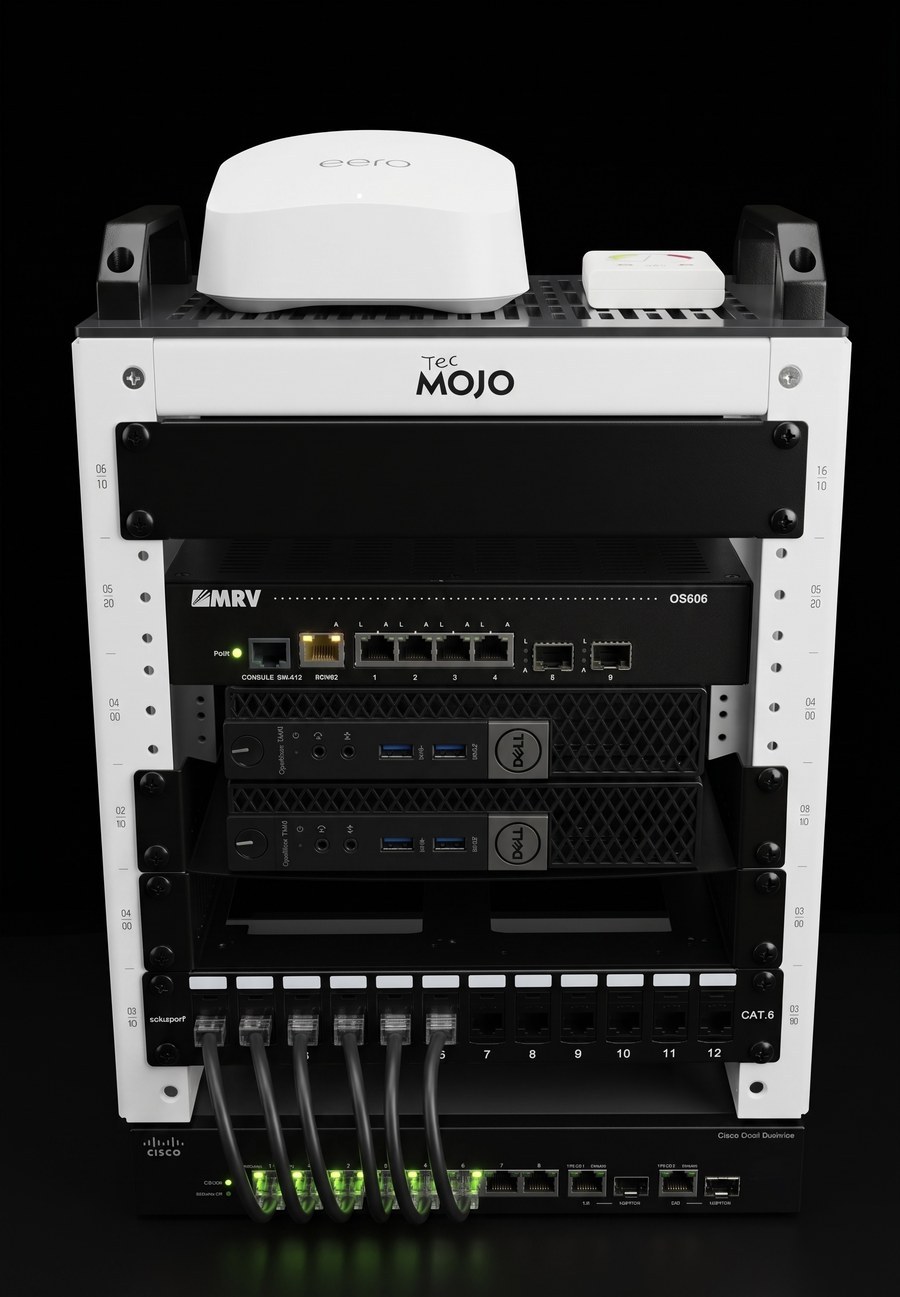
Rushi’s homelab rack with an eero node and LED controller on top, an MRV OS606 optical switch, two Dell OptiPlex Proxmox nodes, a CAT6 patch panel, and a Cisco SG300-10 switch
Interactive homelab rackSelect markers 1–7

Interactive rack

Select a component

Every numbered marker is clickable. Select one to see what it is, what it runs, and how it fits into the lab.

Not pictured: the Dell PowerEdge T440—my third Proxmox node with iDRAC—and the three ceiling-mounted Omada access points.

Rack map

Select a numbered marker for details. Network coordinates and device identifiers stay private.

01

Compute + virtualization

Three nodes, one learning environment.

My Proxmox VE environment combines two Dell OptiPlex nodes with a Dell PowerEdge T440. The T440 adds iDRAC out-of-band management, and the cluster runs a growing fleet of virtual machines and LXC containers.

  • Proxmox VE
  • Dell OptiPlex ×2
  • PowerEdge T440
  • iDRAC
  • VMs + LXC
02

Network

A network designed in layers.

TP-Link Omada ties together the gateway, managed switches, and three ceiling-mounted access points. Segmented VLANs separate management, servers, home devices, and IoT. A Cisco SG300-10 gives me a dedicated place to practice enterprise switching.

  • Omada SDN
  • Managed switching
  • 3 access points
  • Segmented VLANs
  • Cisco SG300-10
03

Identity + security

Trust is verified, not assumed.

A Windows Server domain controller runs Active Directory and NPS RADIUS. Trusted WiFi devices authenticate with WPA2-Enterprise 802.1X, while IoT devices use per-device PPSK keys. AdGuard Home filters DNS, and Tailscale provides remote access with zero exposed ports.

  • Active Directory
  • NPS RADIUS
  • 802.1X
  • Per-device PPSK
  • AdGuard Home
  • Tailscale
04

Self-hosted services

Useful services, owned end to end.

The lab runs the tools my family and I actually use: Home Assistant, AdGuard Home, MeshCentral, Stirling PDF, the Omada controller, a Tailscale subnet router, and custom automation containers.

  • Home Assistant
  • MeshCentral
  • Stirling PDF
  • Omada Controller
  • Subnet router
  • Custom containers
05

Voice

Old line, enterprise handset, next experiment.

A MagicJack line and Cisco enterprise IP phone are part of the lab today. SIP integration is on the roadmap as I keep exploring voice infrastructure.

  • MagicJack
  • Cisco IP phone
  • SIP planned

03 Selected projects

Built because I
wanted it to exist.

Each project starts with a real problem, then becomes an excuse to learn the stack underneath it.

P/01

Home automation / computer vision

Album Art Lights

I built a Python and AppDaemon automation that turns Spotify album art into live room lighting—fast enough to change the moment the track does.

Each cover is split into quadrants. PIL extracts a dominant vibrant color from each one, while Gaussian blur creates smoother, Apple Music-style gradient blending. Four lights per room update in parallel with threading and zero-transition changes.

Two instances run independently in the theater room and bedroom. The logic also handles dark covers and true color-temperature whites instead of forcing every frame into RGB.

  1. 01Spotify
  2. 02PIL analysis
  3. 03AppDaemon
  4. 044 lights / room
  • Python
  • Home Assistant
  • AppDaemon
  • PIL
  • Threading
  • 1 sec polling
View Album Art Lights on GitHub
Album Art Lights · illustrative system viewSpotify → 4 fixtures / room
P/02

Data pipeline / self-hosting

Overnight Market Scanner

Every weekday at 8:55 AM ET, a dedicated LXC container builds the market context I want on screen before the 9:30 open.

The pipeline pulls 90 days of data and scans roughly 180 tickers. It calculates excess return against SPY, QQQ, ES, and NQ across 1-, 5-, and 20-day windows, plus relative volume, premarket gaps, overnight futures moves, and implied opens.

It publishes a dark-mode HTML dashboard on my LAN. Cron schedules the scan, while systemd keeps the dashboard available. The output is analysis only—not trade execution or advice.

  1. 01Market data
  2. 02pandas pipeline
  3. 03~180 tickers
  4. 04LAN dashboard
  • Python
  • pandas
  • yfinance
  • LXC
  • cron
  • systemd
Overnight scanMarket context before the open
Synthetic demo · no live data
SPY▼ −2.64%implied from ES
QQQ▲ +1.44%implied from NQ
ES▼ −0.37%overnight
NQ▲ +0.54%overnight
Sample watchlistGap · RVOL · composite strength
SHOP
Gap
▲ +6.01%
RVOL
3.39×
RS comp
+6.15%
RS leader
ALLY
Gap
▲ +4.93%
RVOL
3.61×
RS comp
−11.60%
RW laggard
MSFT
Gap
▼ −6.03%
RVOL
2.77×
RS comp
+0.79%
Strong

Synthetic sample values · informational tooling, not financial advice.

Automated morning report · synthetic sample runCompact preview · test dataOpen full report
P/03

Network operations / ongoing

Network Device Forensics

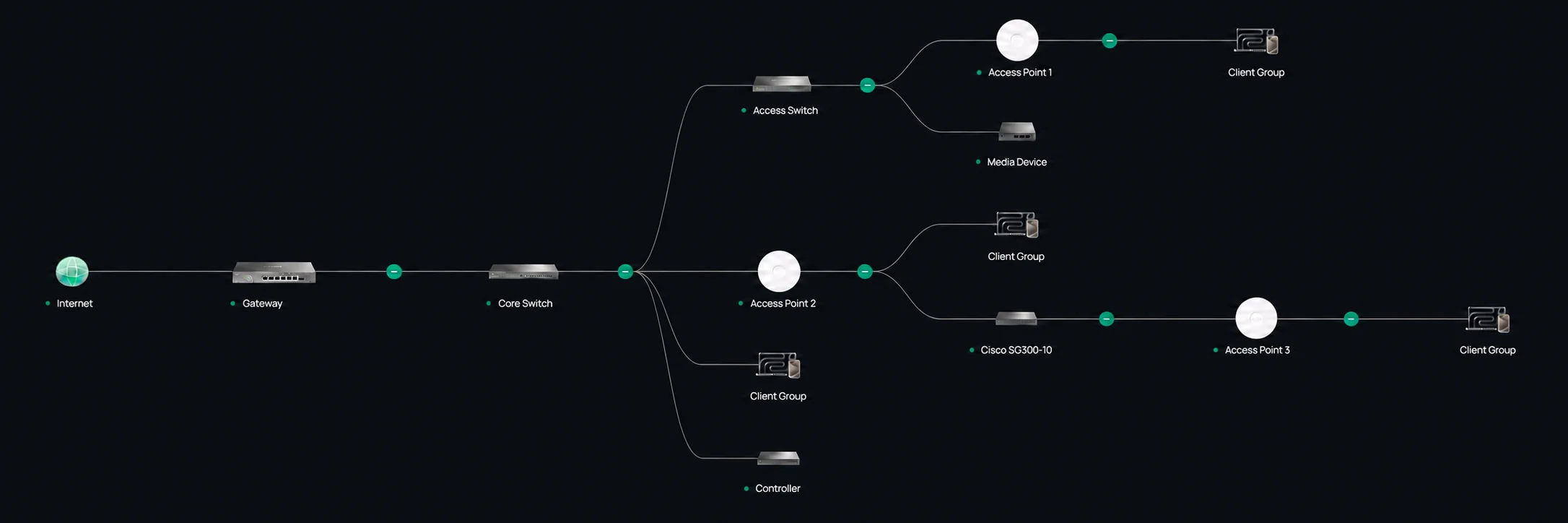
A 60+ client network gets complicated quickly. I’m building a repeatable process to identify unknown devices and keep the network mapped and secure.

I combine MAC OUI analysis, DNS query-log fingerprinting through AdGuard, port scans, and process-level tracing. One signal rarely tells the whole story; correlating several of them usually does.

This is an ongoing operational project, not a one-time inventory. As devices change, the map and identification process evolve with them.

  1. 01Unknown client
  2. 02Network signals
  3. 03Process tracing
  4. 04Verified inventory
  • MAC OUI
  • AdGuard logs
  • Port scanning
  • Process tracing
  • 60+ clients
Redacted Omada network topology showing a gateway, managed switches, three access points, a controller, and grouped clients
Omada controller · redacted live topologyOpen full size
P/04

In development / iOS concept

LiDAR Wi-Fi Planner

I’m designing an iOS concept that explores how iPhone LiDAR scans could help visualize residential Wi-Fi coverage and plan mesh node placement.

The proposed experience turns a scan of a home’s layout into an estimated coverage heat map, then helps users explore placement options without tying recommendations to a specific networking vendor.

This project is still in the design and validation stage. The scanning workflow, coverage model, and placement guidance are planned capabilities—not a finished product.

  1. 01LiDAR room scan
  2. 02Spatial home model
  3. 03Estimated heat map
  4. 04Mesh placement
  • iOS concept
  • iPhone LiDAR
  • Wi-Fi planning
  • Spatial mapping
  • Data visualization
  • Product design
LiDAR Wi-Fi Planner · concept interfaceScan → estimate → place

04 Family IT

The unofficial help desk
is always open.

I build, fix, secure, and remotely support the technology my family uses every day. It’s real operational experience: the systems have users, and those users expect them to work.

01

Remote support

I use MeshCentral to diagnose and fix family devices without needing to be in the same room—or the same place.

02

Setup + repair

New computers, phones, printers, updates, backups, and the inevitable ‘why did this stop working?’

03

Network security

I maintain the network, segmentation, access controls, and secure remote access that keep everyone connected.

04

Ad-free browsing

AdGuard Home filters ads and noisy domains across the house without configuring every device individually.

05

Smart home builds

I connect and automate lights, sensors, and routines through Home Assistant while keeping local control central.

06

Daily operations

These are services people depend on every day, so monitoring, maintenance, and recovery are part of the job.

Operational mindset: keep the services people rely on available, maintained, and recoverable around the clock.

05 Roadmap

Next on the
workbench.

The lab is never really finished. That’s the point.

  1. Next10G networking

    Faster links between the three hypervisor nodes.

  2. In progressCCNA certification

    Deepening the networking fundamentals I practice in the lab.

  3. ExpandMarket scanner

    More analysis and better context while keeping the workflow focused.

  4. ExploreVLAN-aware automation

    Smarter automations that understand network boundaries.

  5. In developmentLiDAR Wi-Fi Planner

    Designing and validating a vendor-neutral iOS concept for residential coverage and mesh placement.

06 Contact

Open to learning + opportunities

Have a hard problem?
Let’s talk infrastructure.

I’m interested in internships, college opportunities, and conversations with people building reliable networks, cloud platforms, and infrastructure.